
A smartphone battery is designed to provide reliable power throughout the device's daily use, but like any rechargeable battery, it can eventually develop problems. One of the most serious issues is battery swelling, which occurs when gases build up inside a damaged or deteriorating battery. A swollen battery can put pressure on the display, back cover, internal components, and other parts of the smartphone. In some cases, it can also create a serious safety hazard. Understanding why battery swelling happens and recognizing the warning signs early can help users take appropriate action. At NanoTech Mobile, trained technicians can assess battery-related problems and determine the safest repair solution. Whether you are looking for dependable iphone repair in regina or professional samsung phone repair in regina, proper battery care and timely attention can help protect your smartphone from serious damage.
What Is Smartphone Battery Swelling?
Most modern smartphones use lithium-ion or lithium-polymer rechargeable batteries. Under normal conditions, these batteries safely store and release electrical energy.
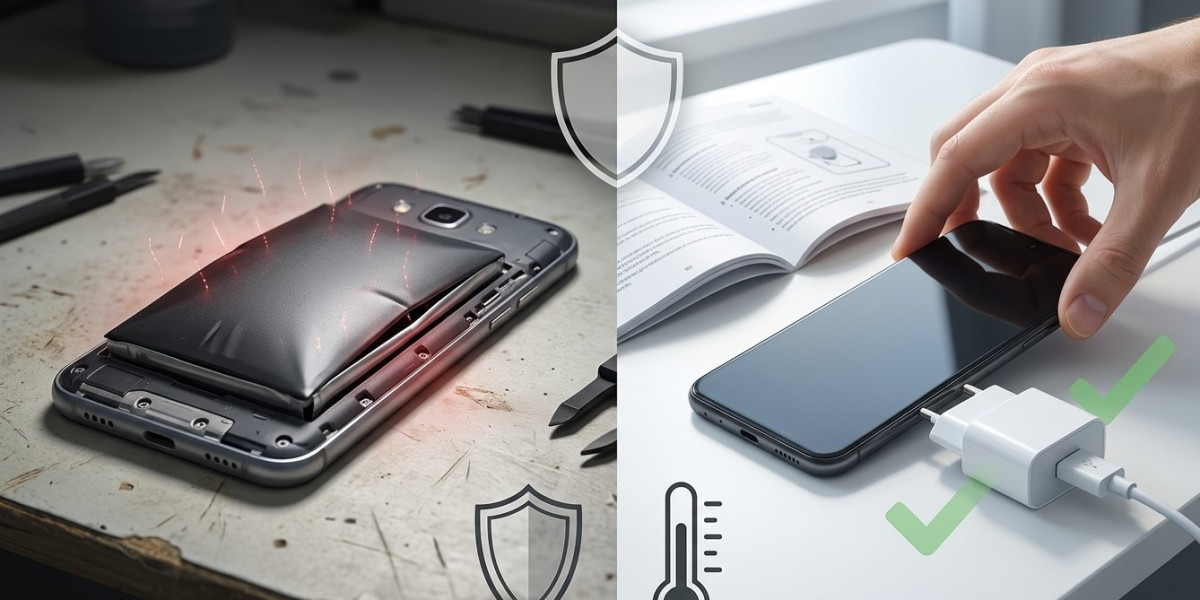
Over time, however, chemical reactions inside a battery can produce gases. If those gases accumulate, the battery can expand or swell.
A swollen battery may push against surrounding components and cause visible changes to the smartphone's shape.
Potential signs include:
- A raised or lifting screen.
- A bulging back panel.
- Unusual gaps around the phone's frame.
- Difficulty pressing buttons.
- A device that no longer sits flat.
- Unexpected battery performance changes.
Battery swelling should never be treated as a normal part of smartphone aging.
Why Smartphone Batteries Swell
Several factors can contribute to battery swelling.
Common causes include:
- Natural battery aging.
- Excessive heat.
- Physical damage.
- Manufacturing defects.
- Overcharging or improper charging conditions.
- Poor-quality replacement batteries.
- Internal battery degradation.
While users cannot prevent every possible battery failure, proper smartphone care can reduce unnecessary stress on the battery.
1. Protect Your Smartphone From Excessive Heat
Heat is one of the biggest environmental factors affecting rechargeable batteries.
Leaving a smartphone in direct sunlight, inside a hot vehicle, or near another heat source can raise the battery temperature significantly.
High temperatures can accelerate battery degradation and increase the likelihood of battery-related problems.
Keep your smartphone away from excessive heat whenever possible. If the device becomes unusually hot, stop demanding activities and allow it to cool naturally.
Never use extreme cooling methods such as placing the phone in a refrigerator or freezer.
2. Use Reliable Charging Accessories
The charger and cable play an important role in safe smartphone charging.
Use compatible charging accessories from reputable manufacturers and avoid visibly damaged cables or adapters.
Poor-quality accessories may provide unstable power or fail to meet the device's charging requirements.
If an adapter or cable becomes damaged, replace it rather than continuing to use it.
3. Avoid Physical Damage to the Battery
A smartphone battery can be damaged by significant impact, pressure, bending, or punctures.
Never deliberately bend or press a smartphone, and replace damaged devices rather than attempting to continue using them normally.
A drop may damage internal battery components even if the exterior looks relatively normal.
If battery behaviour changes significantly after an impact, professional inspection is recommended.
4. Do Not Ignore Unusual Battery Behaviour
Changes in battery performance can provide early clues that something is wrong.
Watch for:
- Rapid battery drain.
- Unexpected shutdowns.
- Unusual heat.
- Sudden charging changes.
- Significant battery percentage fluctuations.
- A phone that becomes noticeably thicker.
Not every symptom means the battery is swelling, but unusual changes should be investigated rather than ignored.
5. Avoid Using a Damaged Smartphone
If the screen begins lifting away from the frame or the back cover starts separating, stop using the device if possible.
Do not press the display or back panel back into place.
Pressing a swollen battery can damage it further and create additional safety risks.
Keep the device away from heat and flammable materials and seek professional assistance.
6. Do Not Attempt to Puncture or Remove a Swollen Battery Yourself
A swollen lithium battery should never be punctured, squeezed, crushed, or opened using household tools.
Attempting to remove a battery without appropriate equipment can cause accidental damage.
Battery replacement should be handled by a trained professional who understands safe battery handling and disposal procedures.
7. Avoid Unnecessary Heat During Charging
Charging naturally produces some heat, particularly during fast charging or demanding use.
Avoid placing the smartphone under pillows, blankets, or other materials that trap heat while it is charging.
Similarly, avoid intensive gaming or other demanding activities while charging if the device becomes noticeably hot.
Good airflow can help the smartphone manage normal charging temperatures.
8. Keep Your Phone in Good Physical Condition
A protective case can help reduce the effects of everyday impacts.
However, inspect the smartphone periodically for cracks, bending, or other physical damage.
If the device has suffered a significant impact, do not assume that everything inside is functioning normally simply because the screen still works.
Professional inspection can identify hidden battery or internal damage.
Warning Signs of a Swollen Battery
Recognizing battery swelling early is extremely important.
Potential warning signs include:
Raised Screen
If the display appears to lift away from the frame, internal pressure may be pushing against it.
Bulging Back Cover
A back panel that becomes uneven or begins separating from the frame can indicate battery expansion.
Unusual Heat
A device that becomes unusually hot without heavy use should be inspected.
Sudden Battery Changes
Unexpected battery drain, charging abnormalities, or shutdowns can indicate battery deterioration.
Physical Shape Changes
If the phone no longer lies flat on a table or appears visibly thicker, stop using it and seek professional help.
What to Do If You Suspect Battery Swelling
If you suspect that your smartphone battery is swollen, prioritize safety.
Stop charging the phone and avoid pressing or squeezing the affected area.
Do not attempt to puncture, flatten, or remove the battery yourself.
Keep the device in a safe location away from excessive heat and flammable materials, and arrange professional assessment as soon as possible.
If the device becomes extremely hot, smokes, emits an unusual odor, or shows other signs of an immediate battery emergency, move away from it and contact appropriate emergency or safety services rather than handling it.
How Professional Battery Replacement Helps
A professional battery replacement involves more than simply installing a new component.
A technician can inspect the smartphone for related damage, safely remove the old battery, install a compatible replacement, and test the device afterward.
At NanoTech Mobile, professional technicians can evaluate battery condition and identify whether swelling has affected the screen, housing, connectors, or other internal components.
Conclusion
Smartphone battery swelling can result from battery aging, excessive heat, physical damage, poor-quality components, or other battery-related problems. Preventive habits such as avoiding extreme temperatures, using reliable charging accessories, protecting the device from impacts, and monitoring unusual battery behaviour can help reduce the risk. Most importantly, never ignore a raised screen, bulging back cover, unusual heat, or other physical signs of battery swelling. Do not puncture, squeeze, or attempt to remove a swollen battery yourself. At NanoTech Mobile, experienced technicians can assess battery problems and recommend a safe, appropriate repair solution. Whether you require reliable iphone repair in regina or professional samsung phone repair in regina, addressing battery problems early can help protect your smartphone, prevent related component damage, and support safer long-term device use.